PC ONLY, and the G-Coins can only be activated with a Steam PUBG accountPC ONLY, and the G-Coins can only be activated with a Steam PUBG account
DESCRIPTION
Buy pubg-gcoin Gift Cards instantly.
Buy pubg-gcoin Gift Cards instantly.
GUIDE
How to Buy PUBG G-Coin on INDGM
Purchase your PUBG G-Coin quickly and securely through INDGM by following these simple steps.
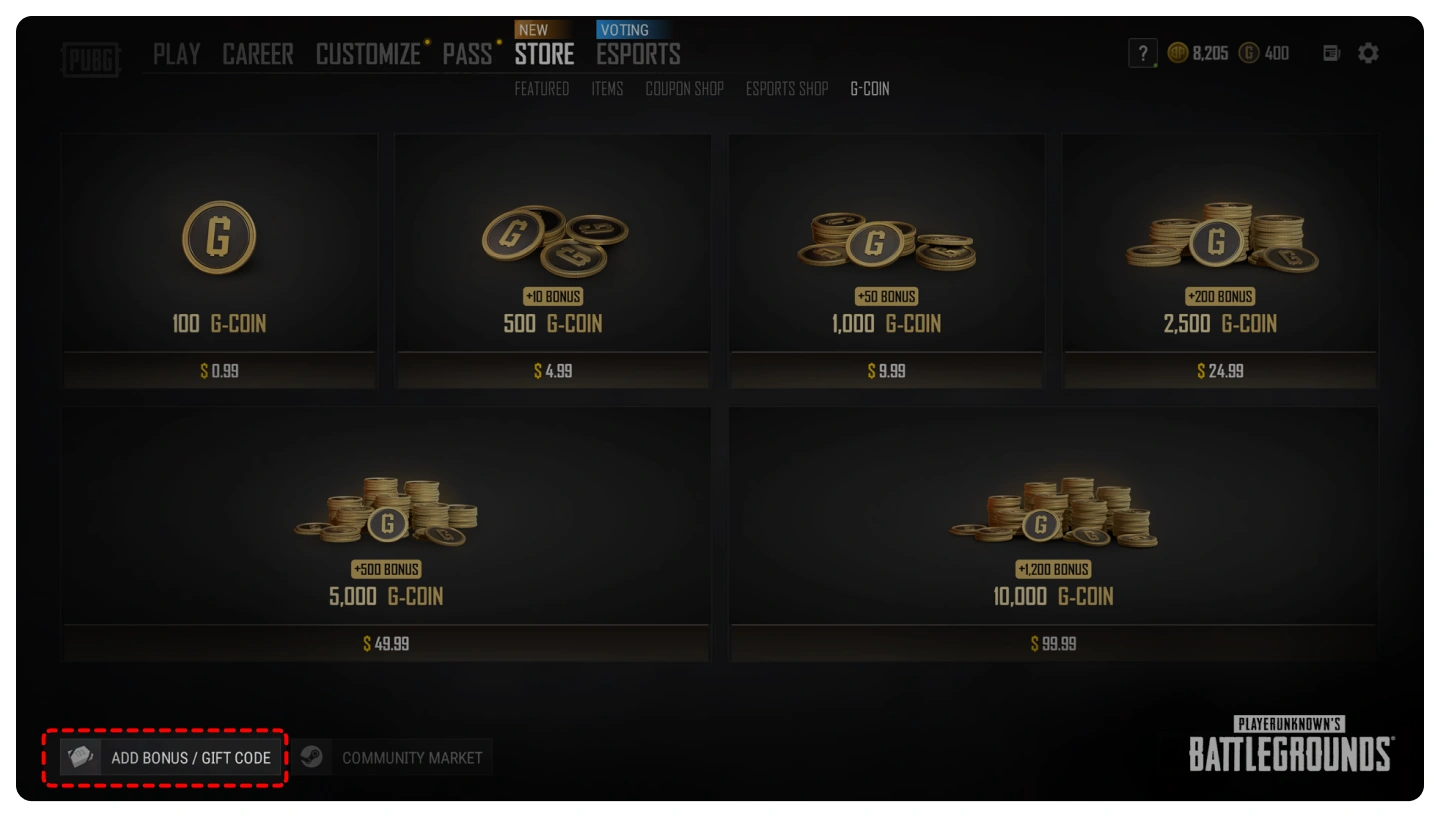
Step 1: Select Your G-Coin Package
Choose the G-Coin package that best suits your needs.
100 G-Coin
500 + 10 G-Coin
1000 + 50 G-Coin
2500 + 200 G-Coin
5000 + 500 G-Coin
10000 + 1200 G-Coin
Step 2: Add to Cart
Click Buy Now or Add to Cart, then proceed to checkout.
Step 3: Complete Payment
Select your preferred payment method and complete your order securely on INDGM.
Step 4: Receive Your Code
After your payment has been successfully confirmed, your PUBG G-Coin redemption code will be delivered instantly to your INDGM account and your registered email address.
How to Redeem PUBG G-Coin
Launch PUBG: Battlegrounds on Steam.
Log in to your PUBG account.
From the main lobby, open the Store.
Select Add Bonus / Gift Code.
Enter the G-Coin redemption code provided by INDGM.
Click Redeem.
Your G-Coin will be credited to your account immediately.
Important Notes
This product is valid only for PUBG: Battlegrounds on PC (Steam).
G-Coin codes cannot be redeemed on PUBG Mobile, Xbox, or PlayStation.
Please make sure you are logged into the correct Steam PUBG account before redeeming your code.
Most orders are delivered instantly after payment confirmation.
Once a redemption code has been revealed or redeemed, it cannot be refunded.
Need assistance? Our customer support team is available 24/7 to help you with your PUBG G-Coin purchase.
How to Buy PUBG G-Coin on INDGM
Purchase your PUBG G-Coin quickly and securely through INDGM by following these simple steps.
Step 1: Select Your G-Coin Package
Choose the G-Coin package that best suits your needs.
100 G-Coin
500 + 10 G-Coin
1000 + 50 G-Coin
2500 + 200 G-Coin
5000 + 500 G-Coin
10000 + 1200 G-Coin
Step 2: Add to Cart
Click Buy Now or Add to Cart, then proceed to checkout.
Step 3: Complete Payment
Select your preferred payment method and complete your order securely on INDGM.
Step 4: Receive Your Code
After your payment has been successfully confirmed, your PUBG G-Coin redemption code will be delivered instantly to your INDGM account and your registered email address.
How to Redeem PUBG G-Coin
Launch PUBG: Battlegrounds on Steam.
Log in to your PUBG account.
From the main lobby, open the Store.
Select Add Bonus / Gift Code.
Enter the G-Coin redemption code provided by INDGM.
Click Redeem.
Your G-Coin will be credited to your account immediately.
Important Notes
This product is valid only for PUBG: Battlegrounds on PC (Steam).
G-Coin codes cannot be redeemed on PUBG Mobile, Xbox, or PlayStation.
Please make sure you are logged into the correct Steam PUBG account before redeeming your code.
Most orders are delivered instantly after payment confirmation.
Once a redemption code has been revealed or redeemed, it cannot be refunded.
Need assistance? Our customer support team is available 24/7 to help you with your PUBG G-Coin purchase.