Buying PUBG G-Coin from INDGM is quick, secure, and easy. Follow the steps below to receive your G-Coin redemption code instantly.
Step 1: Choose Your G-Coin Package
Select the amount of G-Coin you wish to purchase.
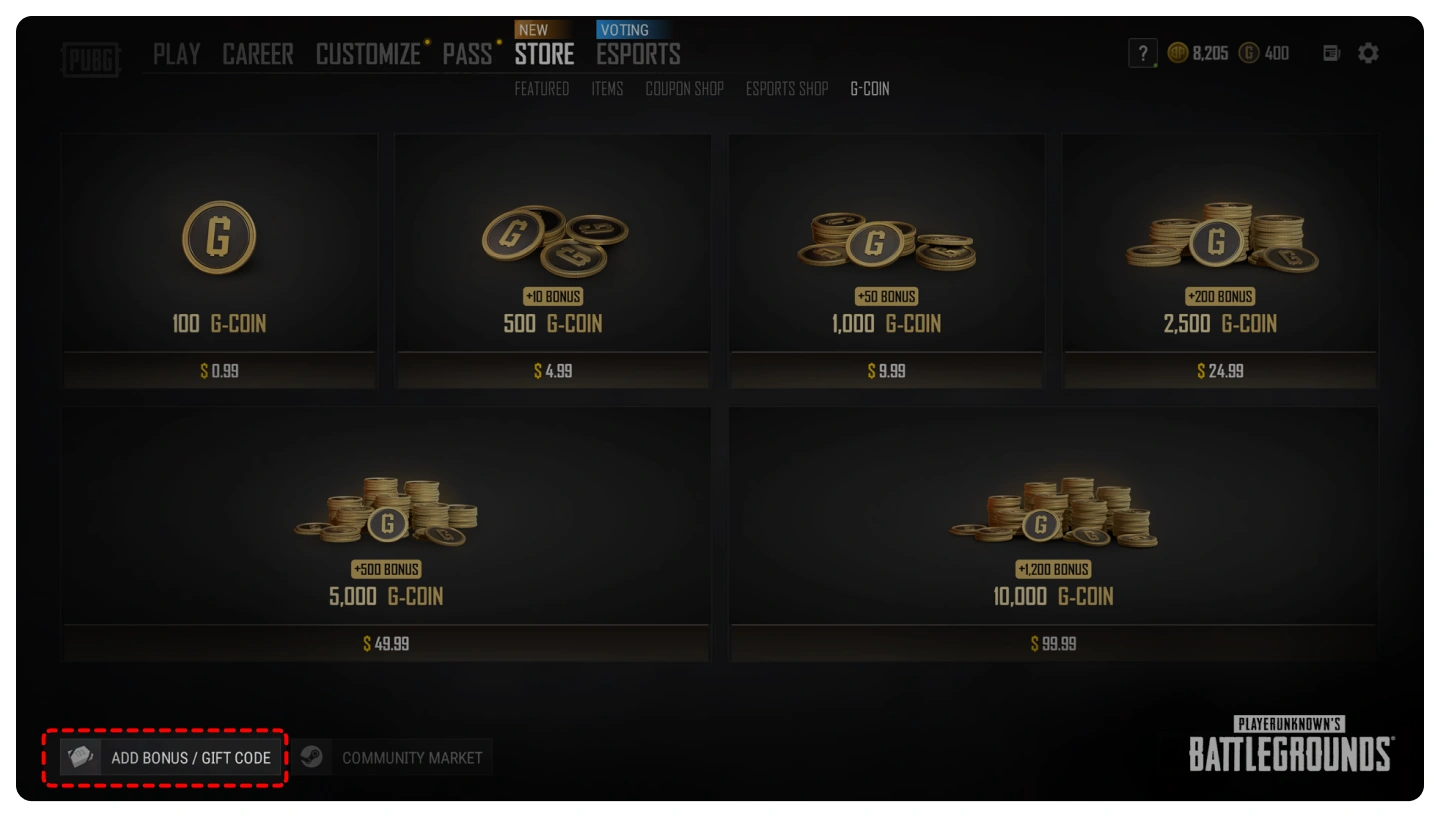
100 G-Coin
500 + 10 G-Coin
1000 + 50 G-Coin
2500 + 200 G-Coin
5000 + 500 G-Coin
10000 + 1200 G-Coin
Step 2: Complete Your Order
Add your selected package to the cart and proceed to checkout.
Choose your preferred payment method and complete your purchase securely through INDGM.
Step 3: Receive Your Redemption Code
Once your payment is successfully confirmed, your PUBG G-Coin redemption code will be delivered instantly to your INDGM account and registered email address.
How to Redeem PUBG G-Coin
Launch PUBG: Battlegrounds on Steam.
Log in to your PUBG account.
From the main lobby, open the Store.
Select Add Bonus / Gift Code.
Enter the G-Coin code received from INDGM.
Click Redeem.
Your G-Coin balance will be added to your PUBG account instantly.
Important Information
This product is for PUBG: Battlegrounds PC (Steam) only.
G-Coin codes can only be redeemed on Steam PUBG accounts.
Please ensure you are logged into the correct PUBG account before redeeming your code.
Redemption codes are generally delivered instantly after payment confirmation.
Keep your redemption code confidential and do not share it with others.
What is PUBG G-Coin?
G-Coin is the official premium currency used in PUBG: Battlegrounds. Players can use G-Coin to purchase exclusive in-game content and premium cosmetics.
G-Coin can be used to buy:
Legendary Character Outfits
Weapon Skins
Vehicle Skins
Emotes
Crates and Keys
Survivor Pass
Limited-Time Event Items
Why Buy PUBG G-Coin?
Purchasing G-Coin allows you to unlock premium content that is not available through normal gameplay.
Unlock exclusive cosmetics.
Purchase the Survivor Pass.
Participate in seasonal events.
Access limited-time collaborations.
Customize your PUBG experience.
Frequently Asked Questions
How long does delivery take?
Most PUBG G-Coin codes are delivered instantly after successful payment.
Is this for PUBG Mobile?
No. This product is only compatible with PUBG: Battlegrounds on PC (Steam). It cannot be used for PUBG Mobile.
Can I redeem the code on Xbox or PlayStation?
No. These codes are designed exclusively for Steam PUBG accounts.
What should I do if I haven't received my code?
Please check your email, spam folder, or your INDGM order history. If you still cannot locate your code, contact our customer support for immediate assistance.
Can redeemed codes be refunded?
Once a redemption code has been revealed or redeemed, it cannot be refunded. Please verify your purchase before completing the payment.
Why Buy PUBG G-Coin from INDGM?
Instant digital code delivery
100% secure transactions
Competitive prices
Genuine PUBG G-Coin codes
24/7 customer support
Convenient payment options for Indian gamers
Purchase PUBG G-Coin from INDGM today and unlock premium content, exclusive cosmetics, and the latest Survivor Pass with fast and secure digital delivery.
How to Buy PUBG G-Coin on INDGM
Buying PUBG G-Coin from INDGM is quick, secure, and easy. Follow the steps below to receive your G-Coin redemption code instantly.
Step 1: Choose Your G-Coin Package
Select the amount of G-Coin you wish to purchase.
100 G-Coin
500 + 10 G-Coin
1000 + 50 G-Coin
2500 + 200 G-Coin
5000 + 500 G-Coin
10000 + 1200 G-Coin
Step 2: Complete Your Order
Add your selected package to the cart and proceed to checkout.
Choose your preferred payment method and complete your purchase securely through INDGM.
Step 3: Receive Your Redemption Code
Once your payment is successfully confirmed, your PUBG G-Coin redemption code will be delivered instantly to your INDGM account and registered email address.
How to Redeem PUBG G-Coin
Launch PUBG: Battlegrounds on Steam.
Log in to your PUBG account.
From the main lobby, open the Store.
Select Add Bonus / Gift Code.
Enter the G-Coin code received from INDGM.
Click Redeem.
Your G-Coin balance will be added to your PUBG account instantly.
Important Information
This product is for PUBG: Battlegrounds PC (Steam) only.
G-Coin codes can only be redeemed on Steam PUBG accounts.
Please ensure you are logged into the correct PUBG account before redeeming your code.
Redemption codes are generally delivered instantly after payment confirmation.
Keep your redemption code confidential and do not share it with others.
What is PUBG G-Coin?
G-Coin is the official premium currency used in PUBG: Battlegrounds. Players can use G-Coin to purchase exclusive in-game content and premium cosmetics.
G-Coin can be used to buy:
Legendary Character Outfits
Weapon Skins
Vehicle Skins
Emotes
Crates and Keys
Survivor Pass
Limited-Time Event Items
Why Buy PUBG G-Coin?
Purchasing G-Coin allows you to unlock premium content that is not available through normal gameplay.
Unlock exclusive cosmetics.
Purchase the Survivor Pass.
Participate in seasonal events.
Access limited-time collaborations.
Customize your PUBG experience.
Frequently Asked Questions
How long does delivery take?
Most PUBG G-Coin codes are delivered instantly after successful payment.
Is this for PUBG Mobile?
No. This product is only compatible with PUBG: Battlegrounds on PC (Steam). It cannot be used for PUBG Mobile.
Can I redeem the code on Xbox or PlayStation?
No. These codes are designed exclusively for Steam PUBG accounts.
What should I do if I haven't received my code?
Please check your email, spam folder, or your INDGM order history. If you still cannot locate your code, contact our customer support for immediate assistance.
Can redeemed codes be refunded?
Once a redemption code has been revealed or redeemed, it cannot be refunded. Please verify your purchase before completing the payment.
Why Buy PUBG G-Coin from INDGM?
Instant digital code delivery
100% secure transactions
Competitive prices
Genuine PUBG G-Coin codes
24/7 customer support
Convenient payment options for Indian gamers
Purchase PUBG G-Coin from INDGM today and unlock premium content, exclusive cosmetics, and the latest Survivor Pass with fast and secure digital delivery.
GUIDE
How to Buy PUBG G-Coin on INDGM
Purchase your PUBG G-Coin quickly and securely through INDGM by following these simple steps.
Step 1: Select Your G-Coin Package
Choose the G-Coin package that best suits your needs.
100 G-Coin
500 + 10 G-Coin
1000 + 50 G-Coin
2500 + 200 G-Coin
5000 + 500 G-Coin
10000 + 1200 G-Coin
Step 2: Add to Cart
Click Buy Now or Add to Cart, then proceed to checkout.
Step 3: Complete Payment
Select your preferred payment method and complete your order securely on INDGM.
Step 4: Receive Your Code
After your payment has been successfully confirmed, your PUBG G-Coin redemption code will be delivered instantly to your INDGM account and your registered email address.
How to Redeem PUBG G-Coin
Launch PUBG: Battlegrounds on Steam.
Log in to your PUBG account.
From the main lobby, open the Store.
Select Add Bonus / Gift Code.
Enter the G-Coin redemption code provided by INDGM.
Click Redeem.
Your G-Coin will be credited to your account immediately.
Important Notes
This product is valid only for PUBG: Battlegrounds on PC (Steam).
G-Coin codes cannot be redeemed on PUBG Mobile, Xbox, or PlayStation.
Please make sure you are logged into the correct Steam PUBG account before redeeming your code.
Most orders are delivered instantly after payment confirmation.
Once a redemption code has been revealed or redeemed, it cannot be refunded.
Need assistance? Our customer support team is available 24/7 to help you with your PUBG G-Coin purchase.
How to Buy PUBG G-Coin on INDGM
Purchase your PUBG G-Coin quickly and securely through INDGM by following these simple steps.
Step 1: Select Your G-Coin Package
Choose the G-Coin package that best suits your needs.
100 G-Coin
500 + 10 G-Coin
1000 + 50 G-Coin
2500 + 200 G-Coin
5000 + 500 G-Coin
10000 + 1200 G-Coin
Step 2: Add to Cart
Click Buy Now or Add to Cart, then proceed to checkout.
Step 3: Complete Payment
Select your preferred payment method and complete your order securely on INDGM.
Step 4: Receive Your Code
After your payment has been successfully confirmed, your PUBG G-Coin redemption code will be delivered instantly to your INDGM account and your registered email address.
How to Redeem PUBG G-Coin
Launch PUBG: Battlegrounds on Steam.
Log in to your PUBG account.
From the main lobby, open the Store.
Select Add Bonus / Gift Code.
Enter the G-Coin redemption code provided by INDGM.
Click Redeem.
Your G-Coin will be credited to your account immediately.
Important Notes
This product is valid only for PUBG: Battlegrounds on PC (Steam).
G-Coin codes cannot be redeemed on PUBG Mobile, Xbox, or PlayStation.
Please make sure you are logged into the correct Steam PUBG account before redeeming your code.
Most orders are delivered instantly after payment confirmation.
Once a redemption code has been revealed or redeemed, it cannot be refunded.
Need assistance? Our customer support team is available 24/7 to help you with your PUBG G-Coin purchase.



 English